
Scooter won’t start? Ride ruined, safety risk! Learn to power on your electric scooter correctly. This guide ensures safe, smooth starts every time.
Turning on your electric scooter involves pre-ride checks, locating and pressing the power button (often on handlebars), understanding display indicators, ensuring sufficient battery, and knowing its starting mode (kick-start/zero start). Master your scooter’s startup by performing pre-ride checks (tires, brakes), using the power button correctly (press-and-hold), deciphering display symbols (battery, mode), and understanding its starting mechanism.
Now that you know the basic steps, let’s dive deeper into each aspect. Properly powering up isn’t just about pressing a button; it’s about ensuring your safety, prolonging your scooter’s life, and guaranteeing every ride is a pleasure. This comprehensive guide will walk you through everything, from essential pre-ride inspections to understanding what those flashing lights on your display really mean, ensuring you become a confident and informed rider.
1. What Should I Check Before I Even Think About Turning On My Electric Scooter?
Before powering on, do pre-ride checks. Check tire inflation. Test brakes – they should be firm. For Dynamic Scooters with dual brakes, check both. Inspect the folding mechanism; ensure it’s locked. Check for loose parts. Glance for damage. Wear closed-toe shoes and a helmet. Clear your path. These steps ensure you and your Dynamic Scooter are ready for a safe journey, leveraging features like its 25kph top speed responsibly.
Pre-Ride Safety Checklist
| Check Item | What to Look For | Importance |
|---|---|---|
| Tire Pressure | Properly inflated | Affects handling, range, puncture risk. |
| Brakes | Firm levers, effective stopping | Crucial for safety. |
| Folding Mechanism | Securely latched | Prevents wobbling. |
| Loose Parts | Solid components | Indicates structural integrity. |
| Visible Damage | No cracks, dents | Ensures scooter is sound. |
| Personal Safety Gear | Helmet, appropriate footwear | Protects rider. |
| Path Clearance | Clear of obstacles | Prevents immediate hazards. |
2. Where is the Power Button Typically Located on an Electric Scooter like the Dynamic Scooter Model B?
Find the power button. On models like Dynamic Scooter Model B, it’s often on the handlebar console, near display/throttle/brakes, or on the stem. The Model B manual confirms handlebar location. It’s usually marked with the power symbol. Familiarize yourself with its feel (press vs. press-and-hold). Knowing its location is fundamental.
Common Power Button Locations & Identifiers
| Location | Cues / Icons | Dynamic Scooter Model B Notes |
|---|---|---|
| Handlebar Console | Near display, power symbol | Most probable, near the central LED screen. |
| Scooter Stem | Sleekly integrated | Secondary location to check. |
| Appearance | Different color/material, backlit, tactile | Designed for durability, often IP54 rated. |
| Unresponsive | Check for debris, clean fingers, do not force | Consult manual or customer support if issues persist. |

3. How Do I Correctly Turn On My Dynamic Scooter Model B?
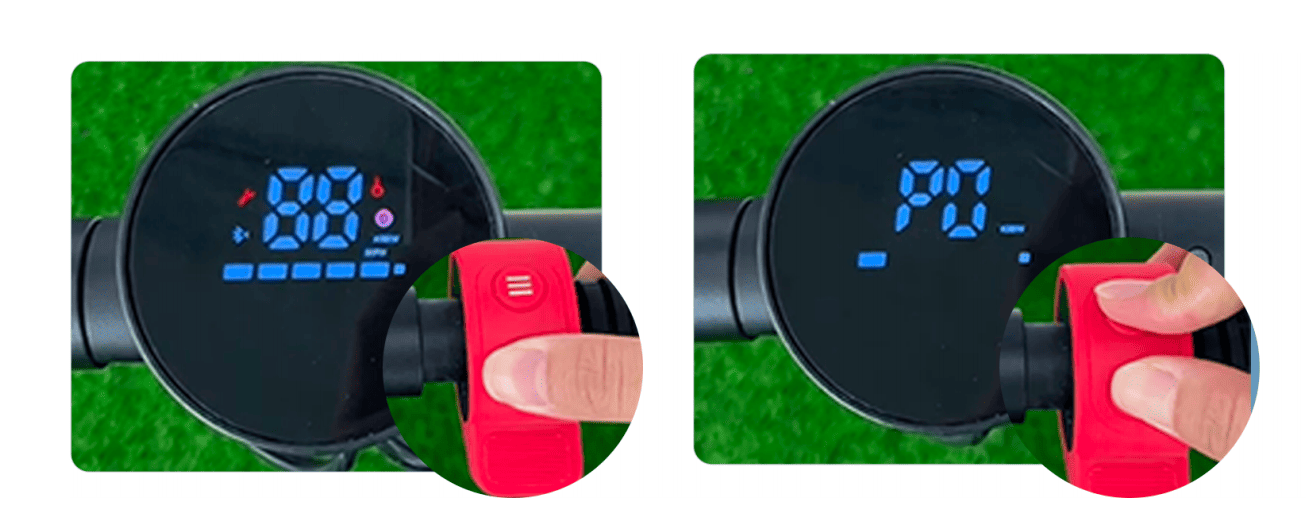
To power on your Dynamic Scooter Model B: the manual states a power button press turns on the display. Most scooters need a 1-2 second press-and-hold. Watch the LED screen for battery/speed mode and listen for beeps. A stable display means it’s on. Verify battery level. Test throttle/brakes. If it powers on then off, charge the battery. This is key to learning how to turn on electric scooter models properly.
Dynamic Scooter Model B: Power-On Sequence Example
| Step | Action | Expected Response | Meaning |
|---|---|---|---|
| 1 | Locate power button | Button visible and accessible | Ready for user input. |
| 2 | Press & HOLD power button (1-3 secs) | LED display illuminates, possible beeps | Scooter systems are activating. |
| 3 | Release button once display active | Display shows battery level, speed mode | Scooter is powered on. |
| 4 | Quick check throttle/brake levers | Levers feel responsive | Physical controls seem operational. |
| 5 | Observe display for errors/warnings | No error codes, battery level adequate | Scooter is ready for mode selection and riding. |
4. What Do the Display Indicators on My Dynamic Scooter Mean When It Powers On?
Understand your Dynamic Scooter’s LED display. The manual details P-settings (P0: KPH/MPH, P1: cruise, P2: start mode). Key symbols: battery level, speed mode (Eco, Standard, Sport), speedometer, odometer, headlight status. Recognize error codes (E01, E02) or warning icons (wrench); consult manual or suppor if they appear. Cycle through info screens using mode/power button. This data access reflects modern scooter sophistication.
Understanding Your Dynamic Scooter Display
| Indicator Type | Symbols / Readouts | Importance |
|---|---|---|
| Battery Level | Bars, %, Voltage | Remaining charge, range planning. |
| Speed Mode | E, S/D, P/Sport | Current performance setting. |
| Speedometer | kph / mph | Current travel speed (P0 on Model B for KPH/MPH). |
| Headlight Status | Bulb icon | Shows if lights are active. |
| Errors/Warnings | E01, E02, icons | Indicates a system fault; consult manual or support. |
| Odometer | km / miles | Tracks distance covered. |
| Cruise Control | Cruise icon | Shows if cruise control is active (P1 on Model B). |
| Starting Mode | Icon/text | Indicates if kick-start is required (P2 on Model B). |

5. How Can I Ensure My Electric Scooter Battery is Sufficiently Charged Before Turning It On?
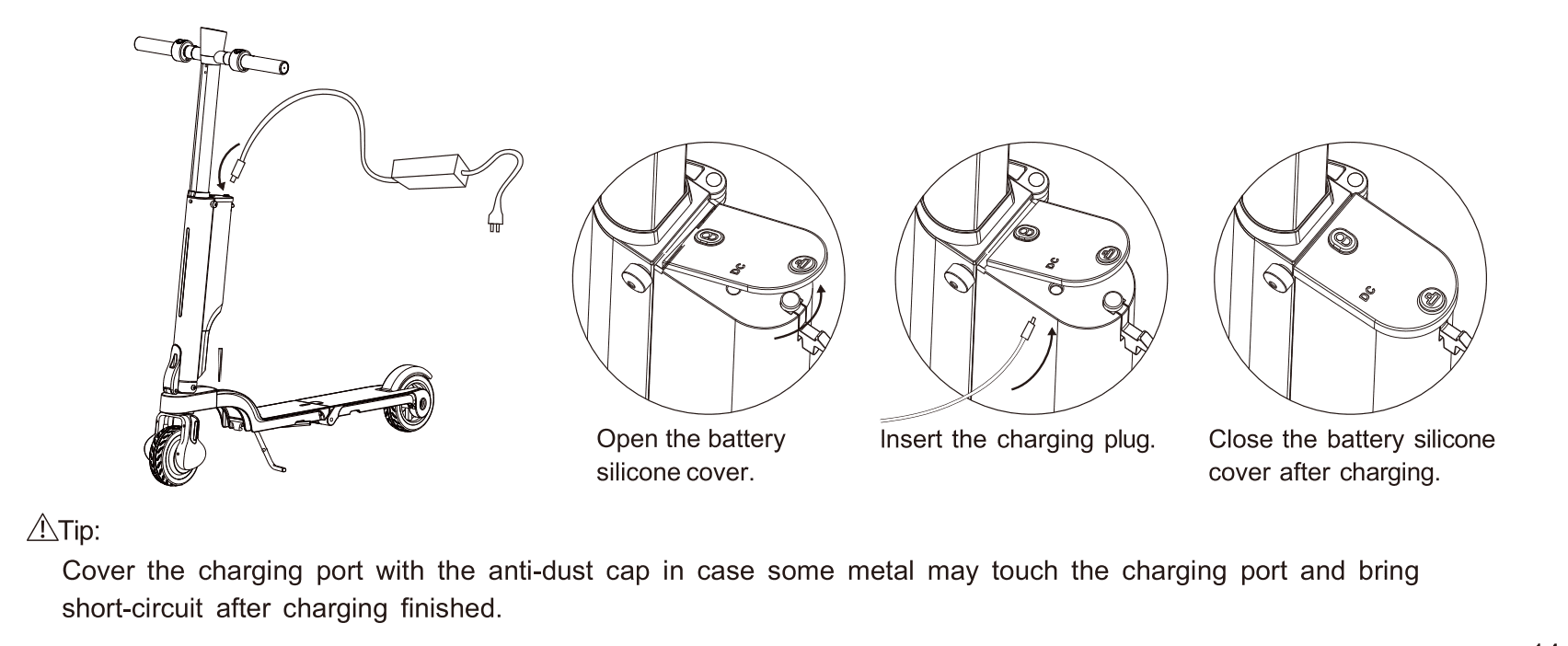
Ensure your scooter battery is charged. Dynamic Scooter Model B (detachable lithium battery, Smart BMS) has clear indicators. Check display for battery level. Use the official charger (red light: charging, green: full). Charge after significant rides; avoid deep discharges. For long storage, aim for 40-60% charge. If issues, check connections, port; contact us, especially considering the battery warranty (often 12 months).
Battery Check & Charging Best Practices
| Action | Best Practice | Importance for Dynamic Scooter |
|---|---|---|
| Check Charge Before Ride | View display indicator. | Ensures sufficient range. |
| Use Official Charger | Use supplied charger or approved equivalent. | Protects battery, ensures correct charging, maintains warranty. |
| Monitor Charger Light | Wait for green light. | Confirms full charge, avoids undercharging. |
| Charge After Rides | Recharge after significant use. | Prolongs lithium battery lifespan; Smart BMS assists. |
| Long-Term Storage | Store at 40-60% charge. | Prevents battery degradation. |
| Troubleshoot Charging | Check connections, port; contact support if needed. | Addresses common problems; allows warranty use. |
6. Does My Electric Scooter Have Different Starting Modes (e.g., Kick-to-Start)?
Understand starting modes. Electric Scooters may offer “zero start” (instant power) or “non-zero start” (kick-to-start). Model B manual: P2 setting for Auto Start (0) or Kick Start (1). Kick-to-start needs a manual push to ~3-5 kph before throttle engages; safer for beginners as it prevents accidental acceleration and allows smoother takeoff. Test mode gently in a safe area. Selectable modes (P2 on Model B) cater to rider skill. If kick-to-start (P2=1), a gentle push suffices.
Starting Modes Explained: Zero Start vs. Kick-to-Start
| Feature | Zero Start (Instant Start) | Non-Zero Start (Kick-to-Start) | Dynamic Scooter Model B Implication |
|---|---|---|---|
| Activation | Motor engages immediately when throttle pressed. | Motor engages after manual push to min. speed. | P2 Setting: 0 for Auto Start, 1 for Kick Start. |
| Pros | Instant power, quick acceleration. | Smoother takeoff, better control for beginners. | User choice for tailored riding experience. |
| Cons | Can be jerky for new riders, risk of accidental start. | Requires initial physical effort. | Users must be aware of selected mode for safe operation. |
| Best For | Experienced riders, quick movement needs. | New riders, congested areas, gentle start preference. | Adaptable to skill levels and environments via P2. |
7. What Are the First Steps to Take If My Electric Scooter Does Not Turn On?
Scooter won’t turn on? Check battery charge first. If charged, inspect connections, charging port, power button. Check main fuse/circuit breaker. Consider environment (extreme temperatures, moisture beyond IP54). Note any error codes/beeps. These steps cover common, often fixable reasons for a scooter not powering on.
Basic Troubleshooting: Scooter Won’t Turn On
| Symptom | Potential Cause | Action |
|---|---|---|
| No response at all | Dead battery, faulty charger/port, loose connection, fuse. | Charge fully, check connections, consult manual for fuse. |
| Display flickers & then dies | Critically low battery. | Charge fully. Avoid repeated power-on attempts. |
| Power button feels stuck | Physical obstruction, internal button damage. | Gently clean; if no improvement, consult support. |
| Exposed to extreme temp. | Battery performance affected, condensation. | Allow scooter to acclimatize to moderate temperature. |
| Got unusually wet | Moisture ingress affecting electronics. | Allow to dry thoroughly in a ventilated area. |
| Error code or beep pattern | Specific system fault (controller, motor, BMS, etc.). | Note code/pattern, consult manual, contact support. |
If you want to know more about electric scooter won’t start, please check out this article for detailed professional solutions to this problem.

8. How Should I Properly Turn Off My Electric Scooter After a Ride?
To turn off your Electric Scooter: after stopping, press-and-hold power button for a few seconds. Display should go blank, possibly with a beep. Proper shutdown saves battery and prevents accidental activation. Check final battery level. Ensure lights are off. If it won’t turn off (stuck button, software glitch), consult your Dynamic Scooter manual. Proper shutdown contributes to longevity and safety.
Proper Scooter Shutdown: A Quick Checklist
| Step | Action | Purpose / Benefit |
|---|---|---|
| 1 | Come to a complete and safe stop. | Ensures safety before dismounting and powering off. |
| 2 | Dismount the scooter carefully. | Prevents accidental movement during shutdown. |
| 3 | Press and HOLD the power button (1-3 secs). | Initiates shutdown sequence correctly. |
| 4 | Observe display and listen for cues (blank screen, beep). | Confirms successful shutdown. |
| 5 | Confirm all lights and auxiliary systems are off. | Ensures no residual power drain. |
| 6 | If storing, consider battery level and environment. | Optimal storage preserves battery health. |
| 7 | If scooter fails to turn off, consult manual/contact support. | Addresses potential underlying issues promptly. |
9. What Common Mistakes Do Beginners Make When Turning On an Electric Scooter?
Beginners: don’t skip pre-ride checks. Use power button correctly (press-and-hold for Dynamic Scooter Model B, not a tap). Don’t ignore display indicators (battery, mode, warnings). Understand starting modes (zero vs. kick-to-start; P2 on Model B). Don’t alter settings (P0: KPH/MPH, P1: cruise on Model B) without manual. Care for battery (official charger, avoid deep discharge). Start in a safe environment. Dynamic Scooter encourages safe riding.
Avoiding Common Beginner Power-On Mistakes
| Mistake | How to Avoid |
|---|---|
| Skipping Pre-Ride Checks | Always perform thorough checks (tires, brakes, etc.) before every ride. |
| Incorrect Power Button Usage | Consult manual; most require a 1-3 second press-and-hold (like Dynamic Scooter Model B). |
| Ignoring Display Indicators | Learn key display symbols and always check upon startup. |
| Not Understanding Starting Mode | Check manual for default mode and how to change it (e.g., P2 setting on Model B). |
| Altering Advanced Settings Without Knowledge | Familiarize with manual before changing P-settings or other configurations. |
| Neglecting Battery Care & Charging | Use official charger, follow recommended charging cycles, and proper storage. |
| Unsafe Starting Environment | Always choose a clear, flat, safe area, away from traffic and pedestrians. |
10. How Does the Way I Turn On My Scooter Affect Its Long-Term Health?
Consistent correct power-on (per Dynamic Scooter Model B manual) helps system initialization. Rushing or interrupting can stress components. Powering on with low battery or ignoring errors also stresses parts like the battery, controller, and Smart BMS. Using appropriate start mode (kick-start for beginners via P2 on Model B) reduces strain. Overall care (charging, storage, maintenance) is key, but mindful power-on contributes to Dynamic Scooter’s longevity and reliable service.
Power-On Habits and Long-Term Scooter Health
| Habit | Potential Long-Term Negative Impact if Done Incorrectly | Best Practice for Longevity |
|---|---|---|
| Powering on with Critically Low Battery Repeatedly | Increased stress on battery cells, potential premature degradation. | Charge battery before critically low; avoid forcing power-on when very depleted. |
| Ignoring Startup Error Codes/Warnings Consistently | Unaddressed faults could worsen, leading to significant damage or system failure. | Note and investigate error codes promptly; consult manual or support. |
| Rushed/Interrupted Power-On Sequence Frequently | Minor risk of software glitches, unnecessary stress on controller. | Be deliberate; allow 1-3 seconds to power on fully and initialize. |
| Powering On Immediately After Impact Without Inspection | Risk of exacerbating existing damage, stressing compromised components. | Always inspect for visible damage after falls/impacts before powering on. |
| Consistently Using an Inappropriate Starting Mode | (e.g., Zero-start for beginners in tight spaces) Potentially increased stress on motor/drivetrain. | Use appropriate starting mode for skill/environment (e.g., Kick-start for beginners via P2 setting). |
11. Are There Specific Safety Precautions I Should Take When Turning On My Scooter in Various Locations or Conditions?
Yes, environment matters. Indoors: ensure space, ventilation. Outdoors: clear of pedestrians/pets, scan path for obstacles. Low-light: turn on lights before moving (Dynamic Scooter Model B LED screen shows status). Wet/slippery surfaces (IP54 handles splashes): gentle throttle. Uneven surfaces: careful power engagement. Know local e-scooter laws (Canada, US). Shared paths: be mindful. These, with scooter features (dual-brakes), ensure safety and responsible riding.
Location-Based Startup Safety
| Location/Condition | Key Safety Precaution | Why It Matters |
|---|---|---|
| Indoors (Garage/Hall) | Ensure adequate clear space, good ventilation. | Prevents collisions, allows scooter to acclimatize. |
| Outdoors (General) | Clear of pedestrians/pets, scan path for obstacles. | Prevents accidents, ensures smooth start, vital for 25kph capable scooters. |
| Low-Light Conditions | Turn on scooter headlights BEFORE moving, wear reflective gear. | Enhances visibility for rider and others, crucial for safety. |
| Wet/Slippery Surfaces | Extremely gentle throttle, smooth movements, extra caution. | Reduced tire grip increases skidding risk; IP54 for splashes, not deep water. |
| Uneven Surfaces/Grates | Careful power engagement, awareness of instability. | Can unsettle scooter, risking loss of control during initial acceleration. |
| Regulated Areas | Know and adhere to local e-scooter laws and area regulations. | Avoids fines, ensures legal operation, respects community rules. |
| Shared Paths/Spaces | High awareness of others, clear line of sight, courtesy. | Prevents endangering others, promotes considerate riding. |

12. Where Can I Find Additional Support or Resources If I am Still Unable to Turn On My Dynamic Scooter?
If troubleshooting fails, seek official Dynamic Scooter support. First, consult your user manual (e.g., for Model B) for model-specific help, diagrams, and error code explanations. If needed, contact us with model, serial number, problem description, errors, and steps taken. The official website, https://dynamicscooter.com/, has FAQs and guides. Community forums offer insights, but prioritize official advice for warranty (6-month scooter/12-month battery) . Dynamic Scooter prioritizes prompt support.
Considering the ease of use and safety features discussed, a Dynamic Scooter, like the Model B with its user-friendly controls, detachable battery, and reliable performance, is an excellent choice for your rides.
Conclusion
Mastering how to turn on your Dynamic Scooter—from pre-ride checks to understanding display indicators and modes (like Model B’s P2 starting mode)—is key to a safe, enjoyable, long-lasting experience. We covered scooter readiness, power button use, display messages, battery health, starting modes, troubleshooting, and proper shutdown. Knowing where to find support (support@dynamicscooter.com) makes you a confident owner. Care maximizes performance and lifespan, leveraging Dynamic Scooter’s high cost performance and user-friendly design. Ride safely!

FAQ Section
Q1: Brand new Dynamic Scooter won’t turn on out of the box?
● Fully charge battery with official charger (often shipped with partial charge). Press power button correctly (1-3 second hold for Model B), not just a quick tap.
Q2: How does ‘kick-to-start’ work on a Dynamic Electric Scooter?
● Requires manual push to ~3-5 kph before throttle engages (P2 setting = 1 on Model B). Safer for beginners, prevents accidental acceleration, allows controlled takeoff.
Q3: Okay to leave scooter on for a short break?
● Best to turn off. Saves battery, prevents accidental activation. Dynamic Scooters may have auto-power-off, but manual shutdown is a good habit for safety.
Q4: Flickering/no display when trying to turn on Dynamic Scooter?
● Often critically low battery. Or loose connection/faulty display/controller. Charge fully. If persists, consult manual or contact Dynamic Scooter support.
Q5: Master reset for unresponsive Dynamic Scooter?
● No simple ‘master reset’ button. Complex procedures (P-settings on Model B) per manual or support. Unauthorized attempts may void warranty. Consult official channels first.